AI Models & Voices
Choose the AI engine behind your receptionist
Native models included on every plan — no API key, no extra cost. Prefer GPT, Gemini, or ElevenLabs premium voices? Bring your own key and switch in two clicks.
Included natively — on every plan
These models run on Voka's infrastructure. Pick one per assistant, change it anytime, pay nothing extra.
Kimi K-2.6 & K-2.5
Moonshot AI
Recommended default — fast, sharp, included free

Claude
Anthropic
Included natively — no key required

Llama
Meta
Open-weight workhorse, included free

Qwen
Alibaba Cloud
Included natively — no key required

Mistral
Mistral AI
Included natively — no key required
Bring your own key for premium models
Premium assistants can run on the frontier models you already pay for. Add the key once in Settings → API Keys — only calls made with your key use your key.
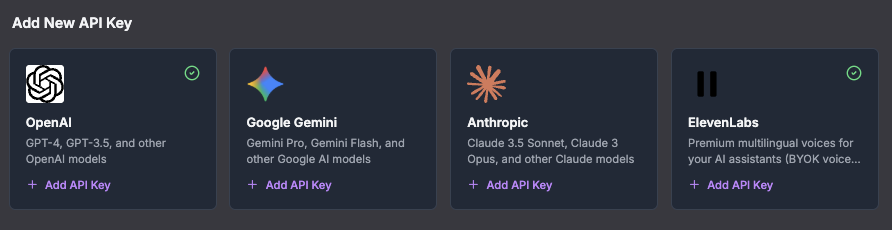
The real thing: Settings → API Keys in your Voka dashboard.
OpenAI GPT models
OpenAI
Your API key, your usage — premium assistants

The real thing: Settings → API Keys in your Voka dashboard.
Google Gemini
Your API key, your usage — premium assistants

ElevenLabs premium voices
Bring your own key
Connect your ElevenLabs API key and your assistant speaks with ElevenLabs premium voices — including multilingual voices that keep their character across languages. Preview any voice before you commit, right in the assistant editor.
No ElevenLabs account? Every plan ships with Voka's built-in voice library, so your assistant sounds professional from the first call.
Frequently Asked Questions
Which AI models are included with Voka AI?
Every plan includes a set of natively hosted models at no extra cost and with no API key required — including Kimi K-2.6 (our recommended default) and K-2.5 from Moonshot AI, Llama, Mistral, Qwen, and a Claude model. You pick the model per assistant and can change it anytime.
Can I use OpenAI GPT or Google Gemini models?
Yes — premium assistants can run on OpenAI and Google Gemini models using your own API key. Add the key once in Settings → API Keys and select the model on the assistant. Only calls made with your key use your key; assistants on native models never touch it.
How do ElevenLabs voices work with Voka AI?
Bring your own ElevenLabs key and your assistant can speak with ElevenLabs premium voices, including multilingual voices. Without a key you still get Voka's built-in voice library. Voice, language, and greeting are configured per assistant.
Do I need to be technical to switch models or voices?
No. Model and voice are dropdown choices in the assistant editor. If a key is missing or invalid, the assistant tells you at configuration time — it never silently fails on a live call.
Hear the difference yourself
Set up an assistant in minutes, pick a model and a voice, and call it.