
Fine-Tuning Acuity Scheduling for Voka AI
Acuity gives you unusually deep control over how booking works — buffers, intake, packages, classes. Voka reads all of it live, which means the settings below decide what your assistant can and cannot do on a call.
Eight settings, about twenty-five minutes, with your Acuity dashboard open in another tab.

Check your plan only for the features that need it
Booking itself works on Standard — Voka connects by OAuth, not the per-account API key that Acuity gates to Premium. What is genuinely plan-dependent is narrower: packages, memberships and gift certificates start at Standard, Acuity’s own text reminders start at Standard and never send during a trial, and your calendar count is capped by tier.
Do this
- In AcuityAccount›Billing
Note your tier. Starter gives you one calendar, Standard six, Premium thirty-six. Calendars are how Acuity models both staff and locations, so count the people and places a caller might choose between.
- In AcuityAccount›Billing
Only move up a tier if you actually want packages, memberships or Acuity text reminders. You do not need Premium for Voka to book.
If it’s wrong, you’ll hear: Nothing, if you are on Standard — booking works. You would only notice the ceiling when you try to sell a package or split a second location onto its own calendar.
Name appointment types the way your clients say them
Voka matches what a caller asks for against your live appointment types by name. Names full of internal shorthand, or several types whose names begin with the same word, are what turn a straightforward request into "we don’t offer that". Durations and padding matter just as much: Acuity computes availability from them, so they decide what times a caller is offered.
Do this
- In AcuityAppointment Types›Types
Read each name out loud. Rename anything you would not say to a client. Keep codes and internal detail in the description.
- In AcuityAppointment Types›Types›each type
Check the duration and the padding before and after. Padding is real time on your calendar — Voka only offers slots where the whole thing fits.
- In AcuityAppointment Types›Types›each type
Anything marked Private stays off the phone as well as off your booking page. That is usually what you want — just know it is why.
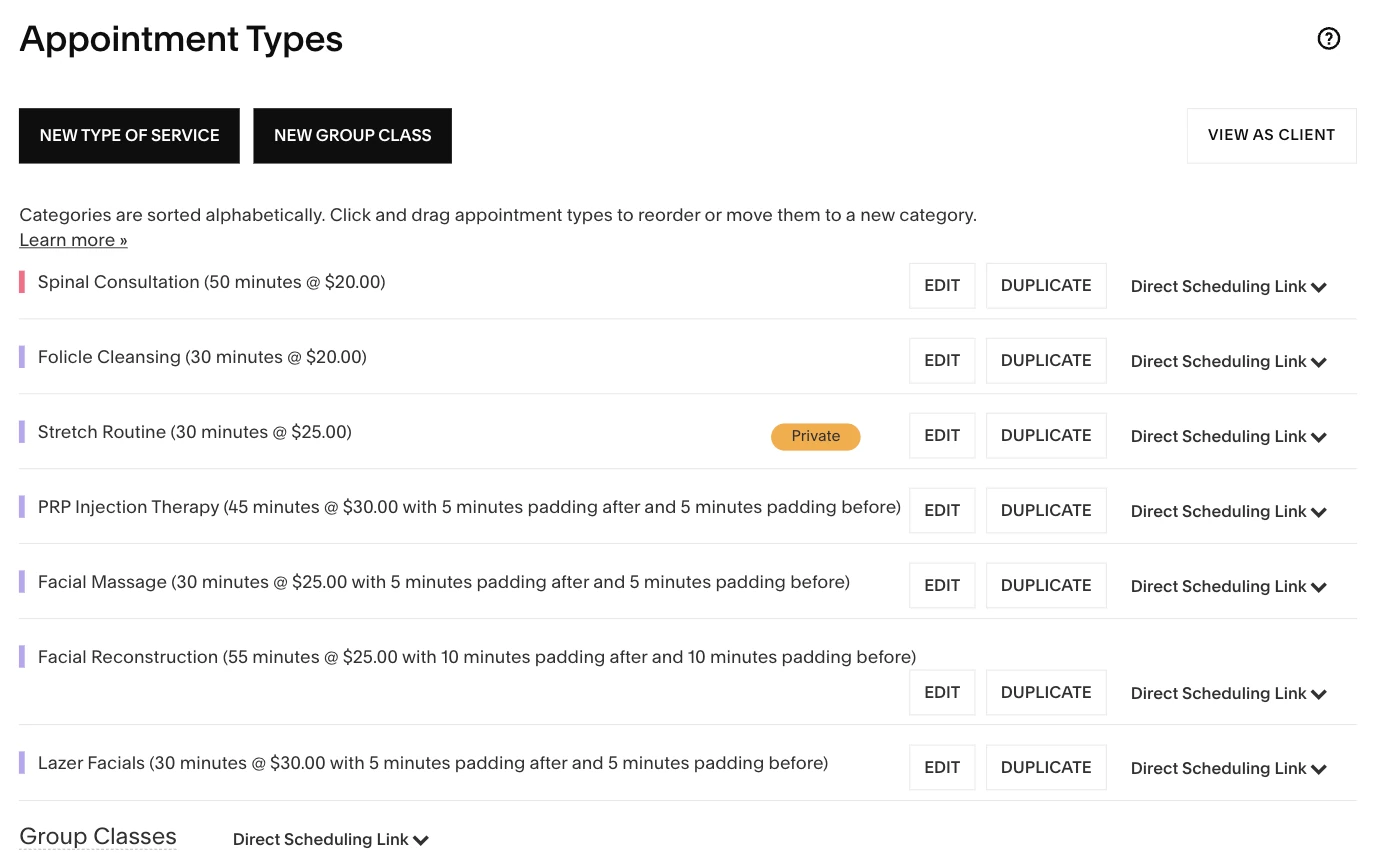
In AcuityDurations, padding, Private services and your categories all come from this page. If it’s wrong, you’ll hear: A caller asks for something by its everyday name and is told you do not offer it — or is offered a time that does not actually work once padding is counted.
Decide whether calendars mean people or places
Acuity has no separate location object. A calendar is either a staff member or a location, and the location is a free-text field on the calendar. That means a caller choosing a person and a caller choosing a shop are the same choice as far as Acuity is concerned, and you cannot cleanly model both dimensions at once.
Do this
- In AcuityAvailability›Calendars
Create one calendar per staff member if clients pick a person, or one per location if they pick a place. Pick the one your callers actually ask by.
- In AcuityAvailability›Calendars›each calendar
Fill in the calendar’s location field with something a caller would recognise — the neighbourhood or the street, not "Calendar 2".
Worth knowing
One practitioner who works at two sites is handled properly: Voka checks both of their calendars together and offers every time that person is genuinely free.
If it’s wrong, you’ll hear: A caller is offered a time at the wrong site, or asked to choose between two calendars whose names mean nothing to them.
Answer the intake questions that do not change
Every required intake question is another thing the assistant has to ask out loud. A three-question form turns a forty-second booking into a much longer call, and every extra question is another chance for something to go wrong. Voka can carry a saved answer for questions whose answer never varies, and submit it for every caller instead of asking.
Do this
- In VokaIntegrations›Acuity Scheduling›Intake form answers
Open the "Worth fixing when you have a minute" panel at the top. It names the exact questions costing you call time and links straight to where you answer them.
- In AcuityIntake Form Questions
Make genuinely optional questions optional. Anything that must be asked on every call should earn its place.
- In AcuityIntake Form Questions
Check for required file-upload questions. Acuity’s API cannot accept a file from a phone booking, so a required one makes that appointment type unbookable by phone.
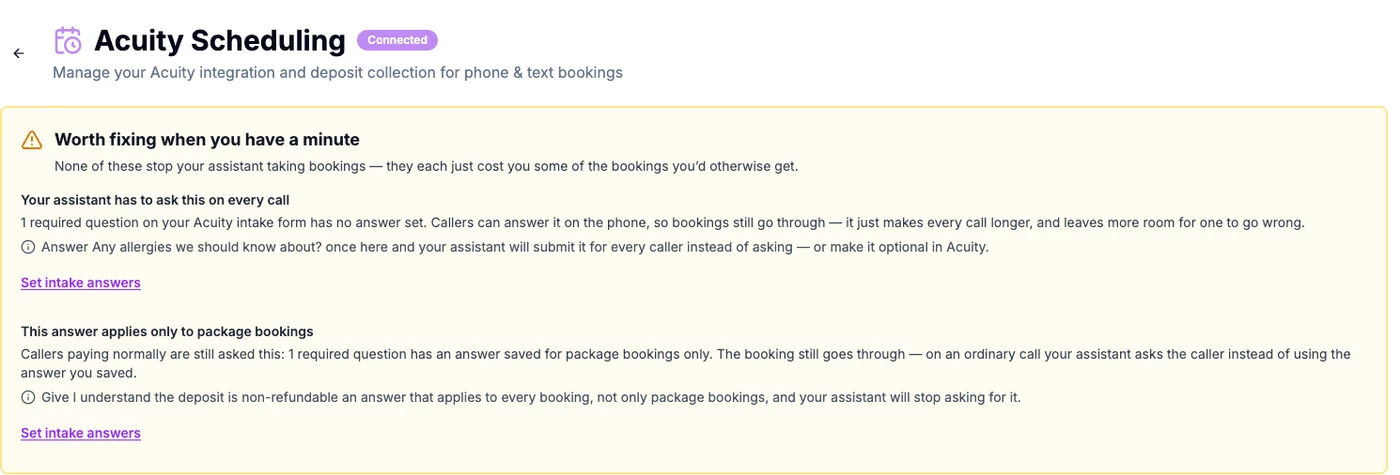
In VokaVoka audits your intake forms and tells you which questions are costing you call time. If it’s wrong, you’ll hear: Calls run long and callers get impatient being asked the same fixed question every time — or a booking dead-ends entirely on a required file upload.
Group a long service list into categories
If your menu is too long to read out, the alternative to a sample of eight services is your own categories: "massage, facials, injectables, or something else — which sounds closest?" Voka then moves to services once the caller picks a direction. It uses your real Acuity categories, and it will refuse to speak them if your account uses the category field as a second name field rather than as real groupings.
Do this
- In AcuityAppointment Types›Types
Group your types into categories that a caller would recognise as directions, not as service names.
- In VokaIntegrations›Acuity Scheduling›Long service lists
Turn it on. It is off by default, and Voka shows you how many services and categories it can see.
If it’s wrong, you’ll hear: Callers hear a long list of example services and pick nothing, or ask the assistant to repeat itself.
Let callers use and buy packages and memberships
If you sell class packs, memberships or gift certificates, Voka can recognise the caller, apply what they already hold automatically at booking, read the remaining balance back and skip the payment prompt when the pack covers the visit. It can also text a link to buy one. When someone holds both a pack and a membership, it spends whichever expires first.
Do this
- In VokaIntegrations›Acuity Scheduling›Selling packages & memberships
Turn it on and confirm how many sellable items Voka can see. It is opt-in per account.
- In AcuityPackages, Gifts & Subscriptions
Check that what you sell is set up here and priced. This needs Acuity Standard or above.
If it’s wrong, you’ll hear: A member with sessions left is asked to pay again, or a caller who wants to buy a pack is told to do it online instead of getting a link.
Choose which add-ons the assistant may offer
Voka offers your Acuity add-ons once, after the caller has picked their service, and Acuity extends the appointment length automatically. Nothing is offered until you approve it — the assistant will not upsell something you did not choose.
Do this
- In VokaIntegrations›Acuity Scheduling›Add-ons
Turn it on and pick which add-ons may be offered on a call.
- In AcuityAppointment Types›Add-ons
Make sure the add-ons you want offered exist and are attached to the right appointment types.
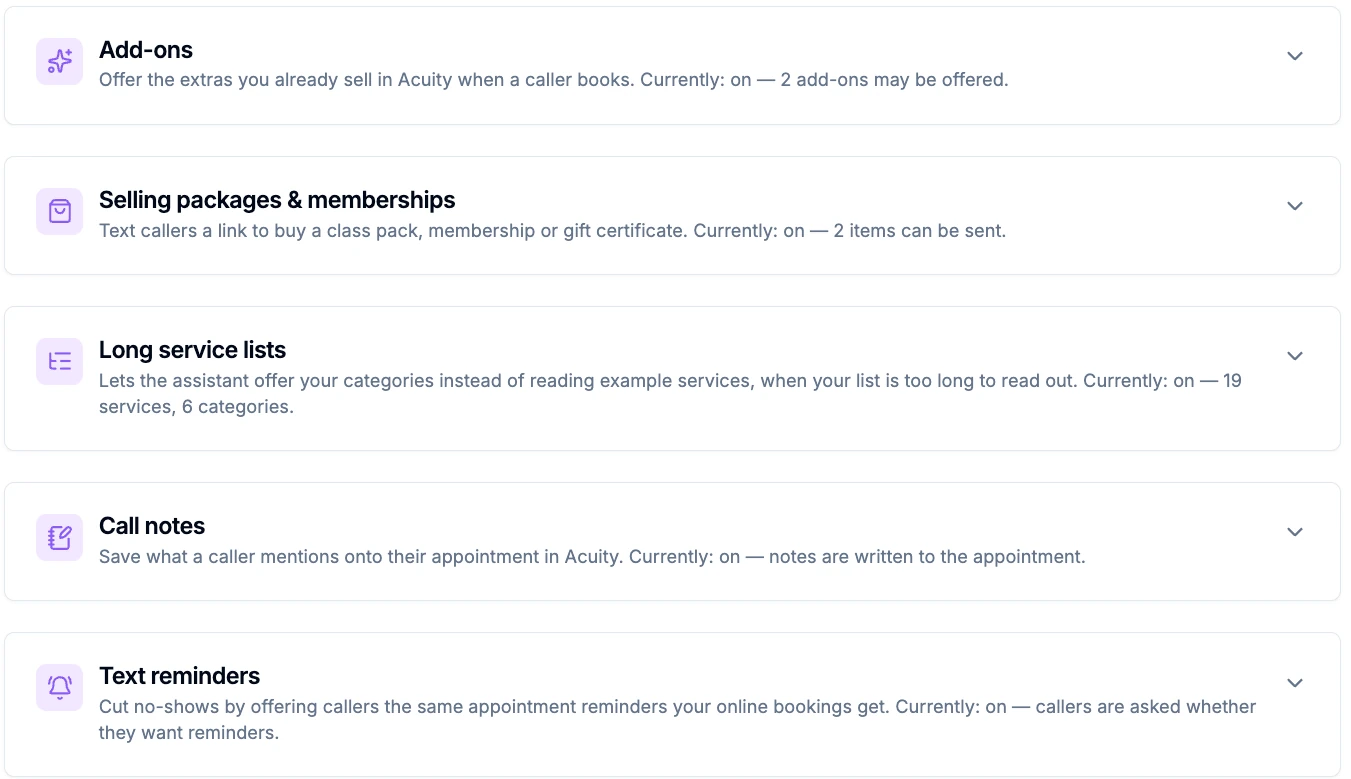
In VokaEach of these is opt-in, and each shows what Voka can currently see in your account. If it’s wrong, you’ll hear: The assistant never mentions the add-on you make the most margin on, because it has not been approved.
Switch on text reminders and call notes
Someone who books on your Acuity page gets a text reminder. Someone who books by phone historically did not. Voka can ask each caller once, before booking, whether they want reminders and opt them in on a yes — Acuity sends them from its own number. Separately, call notes save what a caller volunteers onto the appointment: the gate code, the parking, that they may run ten minutes late.
Do this
- In VokaIntegrations›Acuity Scheduling›Text reminders
Turn it on so phone bookings get the same reminders as online ones. Needs Acuity Standard or above, and reminders do not send on a trial account.
- In VokaIntegrations›Acuity Scheduling›Call notes
Turn it on if you want what callers mention written onto the appointment, in their own words. It is not a call summary and nothing is read back to the caller.
If it’s wrong, you’ll hear: Phone bookings no-show more than online ones, because only the online ones ever got a reminder.
What stays on your Acuity booking page
A few things are finished online rather than on a call. None of this is something to fix — it is a map of where a caller gets sent.
If a caller asks for…
Voka…
Asks forTo sign up for a multi-week course
VokaRecognises it as a series and declines rather than booking one session of it, then points them at your booking page. Booking a single session would leave them thinking they had the whole course.
Asks forTwo seats in the same class
VokaBooks one seat per call. Class booking is seat-aware, but one at a time.
Asks forTo use a coupon code
VokaSends them to your booking page, where coupons apply at checkout.
Asks forTwo services with two different providers
VokaBooks them as separate appointments. One Acuity appointment has one provider; add-ons extend a service rather than chaining a second person onto it.
Asks forTo be added to a waitlist
VokaNever claims to have done it. Offers your nearest real openings and can take a callback request that emails your team.
Now test it
Call your Voka number and book the service you just fixed. If you saved an intake answer, listen for the question not being asked. Then open the appointment in Acuity and check the intake answers, the add-ons and the padding all landed.
Something not behaving as described? hello@vokaai.com — we can pull the recording, the transcript and exactly what Acuity Scheduling returned.
Not a Voka customer yet? See what the Acuity Scheduling integration does.
Frequently asked questions
Do I need to upgrade my Acuity plan to use Voka AI?
Not for booking. Voka connects to Acuity by OAuth and reads availability, books, reschedules and cancels on a Standard account. Two things are genuinely plan-gated on Acuity’s side: packages, memberships and gift certificates need Standard or above, and Acuity’s own text reminders need Standard or above and do not send during a trial. Calendar count is the other limit — one on Starter, six on Standard, thirty-six on Premium — and calendars are how Acuity models both staff and locations.
Why is my assistant asking callers a question I already answered?
Your Manage Acuity page in Voka has a panel called "Worth fixing when you have a minute" that tells you exactly this. A required intake question with no saved answer has to be asked out loud on every call, which lengthens the call and adds a chance to get it wrong. Save an answer once, or make the question optional in Acuity.
Can Voka AI collect any intake question over the phone?
Almost all of them. Text, dropdown, multi-select, yes/no and address questions are all collected conversationally and submitted with the booking. The exception is a file upload — Acuity’s API cannot accept a file from a phone booking, so a required file-upload question makes that appointment type unbookable by phone. Make those optional, or keep that service online-only.
How does Voka AI handle prepaid packages and memberships?
It recognises the caller, applies the pack or membership automatically at booking, reads the remaining balance back, and skips the payment prompt when the pack covers the visit. It can also text a link to buy a pack, membership or gift certificate. This needs Acuity Standard or above, since that is where packages and subscriptions begin.
Can Voka AI book group classes?
Yes, with real seat counts, and it tells a sold-out class apart from no class that day. It books one seat at a time. A multi-week series is different — Voka detects a series and declines it rather than booking a single session of it, which would leave the client thinking they had signed up for the whole course.
Why does my assistant read out categories instead of services?
Because your service list is too long to say out loud. Rather than reading a sample of eight, Voka offers your own Acuity categories first — "massage, facials, injectables, or something else" — and then goes to services once the caller picks a direction. It is optional and off by default. It will refuse to speak categories if your account uses the category field as a second name field rather than as real groupings.
Does Voka AI run a waitlist?
No, and it will never tell a caller it has added them to one. When a time is full it offers your nearest real openings, and it can take a callback request that emails your team.
Related
Acuity platform behaviour described here was verified against Acuity’s own developer and help-centre documentation on September 3, 2026. Menu paths follow the Acuity dashboard as of that date and may move. Acuity Scheduling is a Squarespace company. Voka AI is an independent product that connects to Acuity through its public API, and is not affiliated with, endorsed by, or sponsored by Acuity or Squarespace. Last updated September 3, 2026.