
 Acuity scheduling+Voka AI
Your Acuity Calendar,
Always Booking.
Even When You Can't Answer.
Voka AI connects directly to your Acuity account to answer calls, check your scheduling page availability, and book appointment types — so you never lose a client while you're in session.
Stop Losing Revenue to Missed Calls
Every unanswered call is a client booking with someone else.
Callers Abandon Your Scheduling Page
Many clients prefer calling over navigating your Acuity scheduling page. Voka AI answers and books them into the right appointment type instantly.
Voice-to-Calendar Booking
Intake Forms Go Unfilled Until Check-In
Voka AI collects your Acuity intake form responses over the phone, so client details are already attached to the appointment before they walk in.
Intake Form Pre-Fill
Callers with questions bypass your scheduling page entirely
Many callers want answers about pricing, services, or policies before committing. Voka AI uses your knowledge base to answer questions and then books them — all in one call.
FAQ-to-Booking Pipeline
After-Hours Calls Go to Voicemail
Your Acuity scheduling page works 24/7, but phone inquiries after hours get lost. Voka AI answers every call and books appointments into your live Acuity availability.
Round-the-Clock Booking
Live in Under 5 Minutes
Four steps. No developer needed. No code to write.
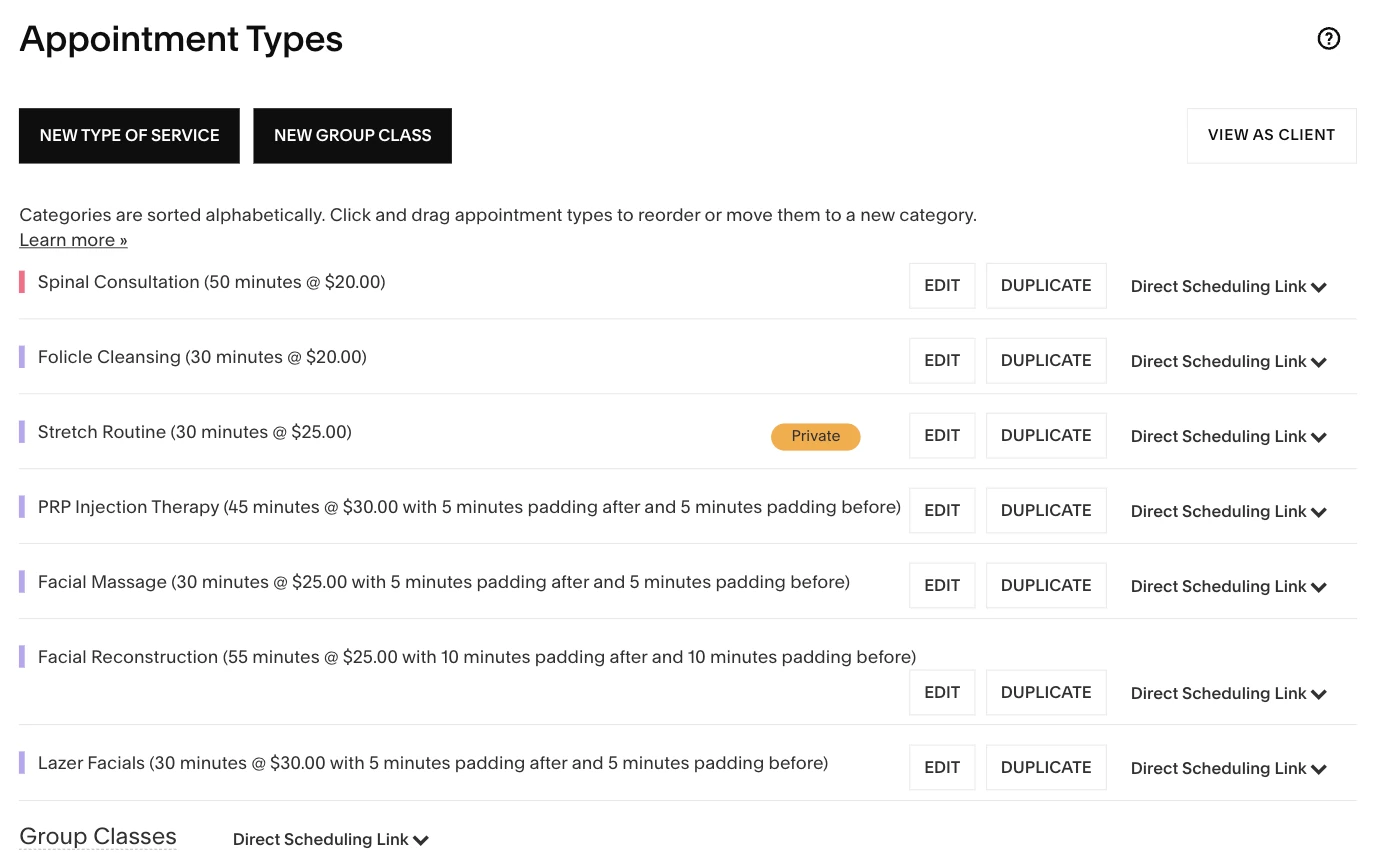
Connect Your Acuity Account
Enable the Acuity Scheduling integration add-on in your Voka AI dashboard, then connect your Acuity account via OAuth. Our MCP server syncs your appointment types, scheduling pages, intake forms, and availability — setup takes under five minutes.
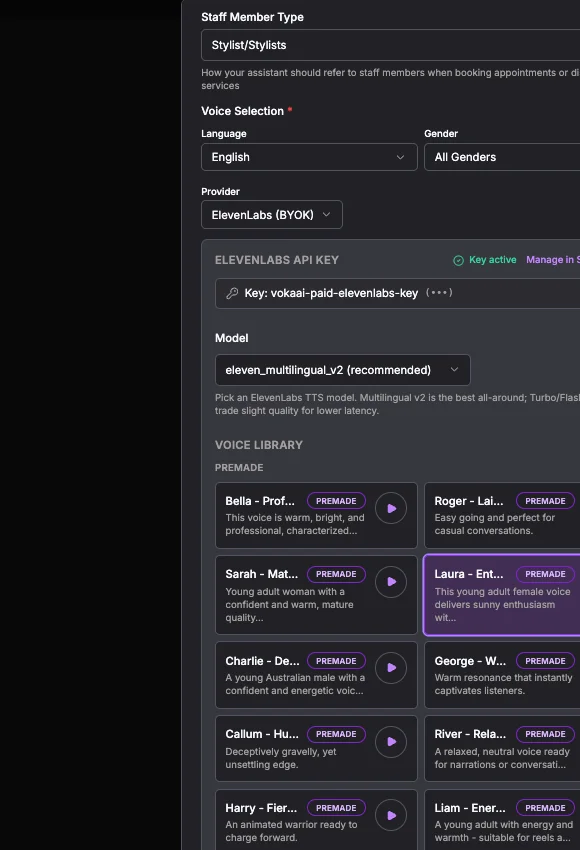
Fine-Tune Your Settings
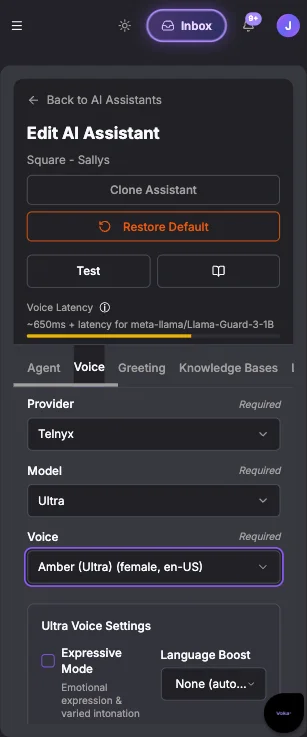
Once connected, our Voka AI MCP server enables real-time pulling of your Acuity appointment types, scheduling pages, intake forms, and availability. From there, make it yours — pick from premium AI voices (multiple providers, including ElevenLabs BYOK), set your preferred language, customize your greeting, and configure transfer-to-human rules for calls that need a personal touch. Manage hours across multiple locations, review AI Insights, and dial in every detail from one dashboard.
Go Live and Start Booking
Forward your business line to Voka AI. Every call is answered, every appointment type is offered from your Acuity service menu, and every booking lands on your Acuity calendar.
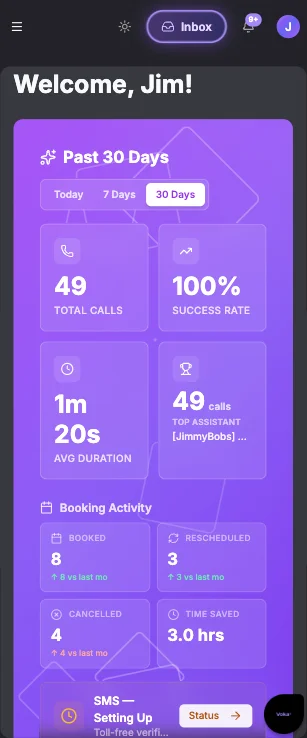
Track Every Engagement at a Glance
Your Voka AI dashboard gives you full visibility into call transcripts, recordings, bookings, reschedules, cancellations, and SMS activity. Monitor total calls, success rates, average duration, time saved, and booking activity — all in one place so you always know how your AI receptionist is performing.
Everything You Need, Built In
Acuity Calendar Sync
Real-time sync with your Acuity calendar. Voka AI reads live availability across all appointment types and scheduling pages to prevent double bookings.
Intake Form Collection
Gather Acuity intake form responses conversationally over the phone. Client details, health history, preferences — all attached to the appointment before arrival.
Deposits & Payment by Text
Keep Acuity’s payment protection working on phone bookings. Full-payment services book on the call with the checkout link texted right after; deposit services get a pre-filled Acuity link where the caller confirms and pays in one step. Choose deposit only, full payment only, caller’s choice — or turn it off entirely.
Sell Packages, Memberships & Gift Certificates
When a caller asks about a class pack, membership, or gift certificate, Voka AI quotes what it is and what it costs from your live Acuity catalog, asks whether they’d like the link — and only then texts your Acuity store link with that item ready to check out. Purchase happens on Acuity’s secure page.
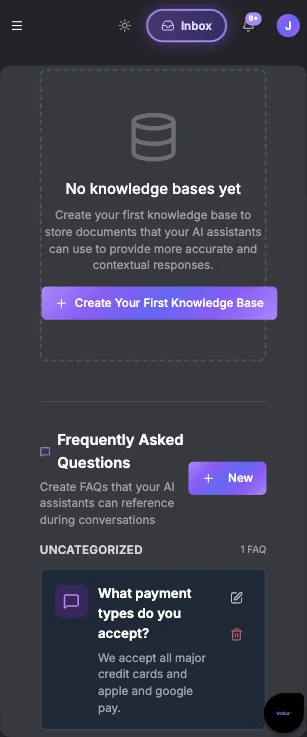
FAQ & Knowledge Base
Your team's frequently asked questions — service details, pricing, policies — are answered automatically so callers get instant answers without staff involvement.
Multi-Language Scheduling
Book Acuity appointments in 12+ languages. Callers describe their needs naturally, and Voka AI matches them to the right appointment type.

Group Classes & Class Packs
Voka AI books class spots against your live Acuity class schedule — seat-aware, so it knows sold-out from no-class-today and mentions when spots run low. Callers with a prepaid pack or membership are recognized by phone number and booked without being asked to pay, with their remaining balance read back.
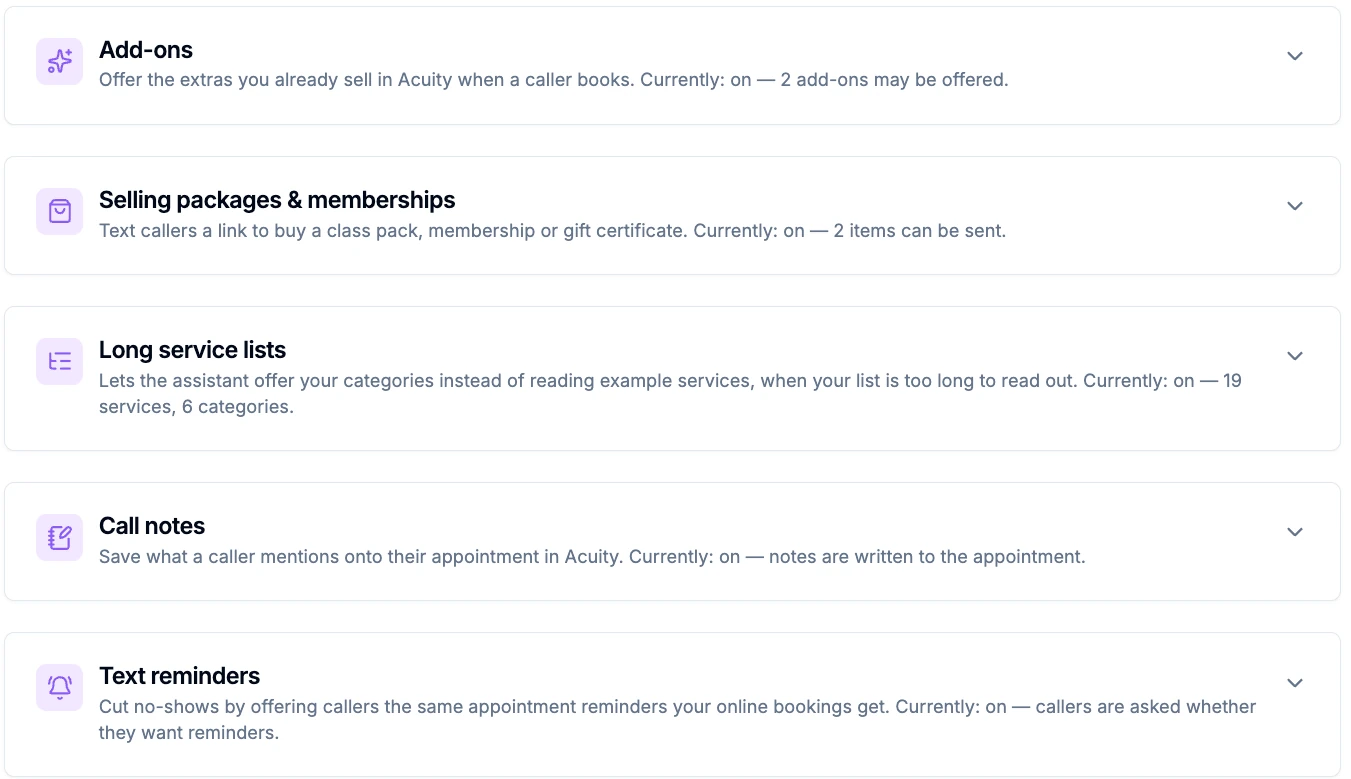
Add-Ons, Offered Your Way
Voka AI offers only the add-ons you approve — nothing is offered until you tick it. After the caller picks a service, the assistant asks once, extends the appointment length automatically when they say yes, and tells them the new duration.
Real-Time Appointment Type Routing
Voka AI's MCP server uses Acuity functions to pull your appointment types and service menu in real time. The AI guides callers to the correct service based on what they describe — always accurate, always up to date.
Staff & Resource Awareness
The same MCP server that checks real-time availability also handles booking, rescheduling, and cancellations — all through Acuity functions so your calendar stays accurate. Callers can request specific providers and get accurate time slots.
Text Reminders on Phone Bookings
Book on your Acuity page and Acuity texts a reminder. Book by phone and it never did. Switch this on and Voka AI asks each caller once before booking — “Would you like text reminders about your appointment?” — and opts them in when they say yes. Acuity sends the reminder from its own number, not Voka SMS.
Call Notes on the Appointment
The gate code, which door to use, that they’re coming from work and may run ten minutes late — what callers volunteer gets written to the appointment’s notes field in Acuity, in their own words. Not a call summary, and nothing is read back to the caller.
Read-Only Payment Lookups
“Did my deposit go through?” is one of the most common reasons someone rings back. Voka AI reads what Acuity has recorded against their appointment — a deposit, payment in full, or a booking already marked paid — and tells them. It takes no payment, sends no link, and issues no refund.
Long Service Lists, Narrowed by Category
With a menu too long to read out, Voka AI offers your Acuity categories instead of a sample of eight services — “massage, facials, injectables, or something else — which sounds closest?” — then goes to services once the caller picks a direction. The categories are your own, read from Acuity.
What Voka AI Books on an Acuity Scheduling Call
This is the bulk of every real-world booking — handled start to finish, right on the call.
Setup & Good to Know
A few things work a little differently on Acuity — each with a clean setup so nothing falls through.
No card numbers over the phone — ever
Voka never asks a caller to read out a card. Deposits and payments happen on Acuity’s own secure checkout, reached by a link Voka texts.
Set it up: Full-payment services book on the call with the checkout link texted right after. Deposit services work link-first: Voka texts a pre-filled Acuity booking link and the caller confirms and pays the deposit in one step. Requires the SMS add-on.
Recurring class series
Multi-week series enrollments can’t be completed by phone.
Set it up: Voka books single class spots — seat-aware, one spot per call — and points series sign-ups to your online page. It never claims a series doesn’t exist.
Coupon codes
Callers can’t apply a coupon or discount code by phone.
Set it up: Codes apply at Acuity’s online checkout as usual — including on the package and payment links Voka texts. Packages and gift certificates themselves can be sold right on the call.
Intake fields you can’t speak
A few field types — file uploads, signatures, address blocks — can’t be completed by voice.
Set it up: Voka recognizes these and directs the caller to finish online. Keep your phone-bookable services’ required fields voice-friendly — text, DOB, dropdowns — and Voka collects them on the call.
Rooms & equipment
Acuity has no separate “resource” concept for rooms or equipment.
Set it up: Model each room or resource as a calendar — Acuity’s standard approach — and Voka books it just like any staff member. Nothing extra needed.
Reminders come from Acuity, not Voka
Voka asks the caller; Acuity sends the text. And because Acuity doesn’t report the opt-in back through its API, Voka says it has asked about reminders — never that they’re set up.
Set it up: Switch on text reminders under Integrations → Acuity, on an Acuity plan that includes text messaging (Voka checks and tells you if yours doesn’t). Verify any booking yourself: the appointment in Acuity shows “Sms Opt-in: Accepted”. This uses no Voka SMS and no SMS add-on.
Payment lookups read the record — they don’t judge it
Voka will never tell a caller they haven’t paid. A payment taken at the desk, spent off a package, or collected any way Acuity never saw looks identical to no payment at all.
Set it up: With nothing on the record, Voka says it can’t see a payment and offers to have your team check, rather than guessing. Record payments against the appointment in Acuity and there’s something to find. Lookups are read-only — no charge, no link, no refund.
Categories come from Acuity
Category narrowing offers the categories already sitting on your Acuity appointment types. There is no list to build or maintain in Voka.
Set it up: Tidy your categories in Acuity, then switch narrowing on. It engages only above eight bookable services and only where your categories genuinely narrow the choice — and a caller who asks for a service by name always still gets it.
See It In Action
Real scenarios from businesses like yours
A new client calls during a yoga class asking about private session availability and pricing for your different appointment types.
Voka AI walks them through your Acuity service menu, answers pricing questions, and books a private session — all while you teach.
New client booked with intake form pre-filled. You see the appointment on your Acuity calendar immediately after class.
of clients prefer booking by phone over navigating online scheduling pages, yet most Acuity users only offer self-service booking.
AI-powered phone coverage ensures your Acuity calendar captures every opportunity.
Simple, Transparent Pricing
No long-term contracts. Cancel anytime.
Frequently Asked Questions
Still weighing options? See how Voka AI compares to Rosie, Smith.ai & Goodcall for Acuity Scheduling.
Enable the Acuity Scheduling integration add-on in your Voka AI dashboard, then connect your Acuity account via OAuth. Our MCP server syncs your appointment types, scheduling pages, intake forms, and availability automatically — no technical knowledge required. Most businesses are live within five minutes.
Yes. Voka AI syncs your entire Acuity service menu including appointment types, durations, pricing, and scheduling page configurations. Every active, non-private appointment type your Acuity account returns is offered to callers — so the way to keep a service off the phone is to mark it private or deactivate it in Acuity, which Voka respects. If your menu is long, you can switch on category narrowing so the assistant offers your Acuity categories instead of reading out example services.
Absolutely. Voka AI maps your Acuity intake form fields to conversational questions and collects responses naturally during the call. The completed intake data is attached directly to the appointment in your Acuity account. Fields that cannot be spoken — file uploads, signatures, or address blocks — are recognized, and Voka AI directs the caller to finish those online.
Yes — Voka AI keeps Acuity's own payment protection working on phone bookings. For full payment, it books the appointment and texts the caller Acuity's secure checkout link. For deposits, it texts a pre-filled Acuity booking link where the caller confirms and pays the deposit in one step. You choose the mode per account: deposit only, full payment only, caller's choice, or none. Payment always happens on Acuity's checkout — never over the phone. Opt-in, and requires the SMS add-on with a verified toll-free number.
Yes, once you switch it on. Voka AI reads back what Acuity has recorded against that caller's appointment — a deposit, a payment in full, or a booking already marked paid on a package or gift certificate. It is read-only: it cannot take a payment, send a payment link, or issue a refund. Callers only ever reach their own appointments, matched to the number they are calling from, the same rule that governs rescheduling and cancelling. One deliberate limit: it will never tell a caller they have not paid. Money taken at the desk, spent off a package, or collected any way Acuity never saw looks identical to no payment, so when the record is empty Voka says it cannot see a payment and offers to have your team check. Off by default.
Yes. When a caller asks about a class pack, membership, or gift certificate, Voka AI quotes what it is and what it costs from your live Acuity catalog, asks whether they'd like the link, and — only once they say yes — texts them your Acuity store link with that item ready to check out. Voka never takes payment itself; purchase happens on Acuity's secure page. This is an opt-in feature, requires the SMS add-on, and needs an Acuity plan that includes packages.
Yes. Voka AI can offer the add-ons you already sell in Acuity — you pick exactly which ones may be offered, and nothing is offered until you approve it. After the caller picks a service, the assistant asks once ("Would you like to add a scalp massage for $20?"), extends the appointment length automatically when they accept, and tells the caller the new duration. Availability always accounts for the extra time.
By default Voka AI names eight services and tells the caller there are more. If your menu is longer than that, you can switch on category narrowing and Voka offers your Acuity categories instead — "we offer twenty-four services across a few areas: massage, facials, injectables, or something else — which sounds closest?" — then moves on to services once the caller picks a direction. The categories are read from your Acuity appointment types, so there is nothing to build or maintain in Voka. It only engages when narrowing genuinely helps: more than eight bookable services, at least two categories, averaging two or more services each, with more of your menu categorised than not. Asking for a service by name always still works. Off by default.
Yes, once you switch it on. Anything the caller volunteers that belongs on the booking — a gate code, where to park, that they are coming from work and may run late — is written to the appointment's notes field in Acuity, condensed and in the caller's own words. It does not summarise the call and does not repeat the service, time, or name already on the booking. Nothing is read back to the caller, so the spoken confirmation is unchanged. Your client is not emailed about the note, and a note your own team wrote is never overwritten. Off by default.
Yes, once you switch it on. Someone who books on your Acuity page is opted in to Acuity's text reminders; someone who books by phone never was. With this on, Voka asks each caller once before booking — "Would you like text reminders about your appointment?" — and opts the booking in when they say yes. It never asks on a reschedule. Acuity sends the reminders from its own number, so this is not Voka SMS and does not need the SMS add-on; it does need an Acuity plan that includes text messaging, which Voka checks and tells you about. Because Acuity does not report the opt-in back through its API, Voka says it has asked about reminders rather than claiming they are set up — you can confirm it yourself on the appointment in Acuity, which shows 'Sms Opt-in: Accepted'. Off by default.
Yes. Voka AI books class spots against your live Acuity class schedule, and it's seat-aware: it knows the difference between a class that's sold out and a day with no class scheduled, mentions when only a few spots remain, and reserves one spot per call so groups are never overpromised. Recurring multi-week series still sign up on your online page — Voka points callers there.
Voka AI recognizes them by their phone number. If their visit is covered by a package, membership, or gift certificate on file, it books the class without asking for payment, uses the credit that expires first, and reads back the remaining balance only after confirming it. Cancel by phone and the credit goes back on the pack — with the new balance read out. The call is tagged 'Package Used' in your call log so you can tell prepaid bookings from new revenue.
Not by phone — coupon and discount codes apply at Acuity's online checkout, including on the payment and package links Voka AI texts. Everything else about the purchase can happen on the call.
Voka AI checks your Acuity availability in real time before confirming any booking. If a slot is taken between the start of the call and the booking confirmation, Voka AI detects the conflict and offers the caller the next available time.
Yes. Voka AI is aware of individual staff calendars within your Acuity account. Callers can request a specific provider by name, and Voka AI will only offer that provider's available time slots when confirming the appointment.
Voka AI reads the duration configured for each appointment type in your Acuity account. When booking, it respects buffer times, padding, and minimum scheduling notice settings so your calendar stays accurate and conflict-free.
No. Your plan includes unlimited bookings and modifications through Voka AI. Whether you receive ten calls a day or two hundred, every caller gets the same fast, accurate booking experience against your live Acuity calendar.
Ready to Book Every Caller?
Join businesses using Voka AI to turn every phone call into a booked appointment on their Acuity calendar.
Setup takes less than 5 minutes. No credit card required.
“I am a solo practitioner offering Japanese-inspired head spa treatments: immersive, multi-sensory sessions that require my complete presence and attention from the moment a client walks in. When I'm delivering a 100-minute Herbal Sleep Support ritual or a sound bath treatment, I cannot be stepping out to answer booking calls. Voka AI changed that completely. The assistant books appointments directly through Square while I'm with clients, handling every inquiry professionally and seamlessly. After each booking it sends a deposit link via SMS, which has eliminated no-shows entirely. My revenue is up, my callbacks are gone, and every hour I have is a billable one. It works beautifully!”
“I run a plumbing and heating company and do not have a front office. When a call comes in after hours, it used to either go to voicemail or I was answering it myself at 10pm. Voka AI changed that. Their assistant now handles every after-hours emergency call, captures the caller's information and the nature of the problem, and immediately sends me an email and a text so I can triage without picking up blind. It also books our larger estimate appointments directly into my Google Calendar. I don't lose jobs to voicemail anymore.”
“We build custom cabinetry and millwork for homeowners and contractors. Every job starts with either a house visit to measure and price the project or a showroom appointment to explore options. Both require scheduling, and scheduling calls were pulling my designer and sales person away from the work that actually moves jobs forward. Voka AI handles all of it now. Homeowners calling after hours to request a pricing visit get scheduled on the spot, directly into our Google Calendar. Contractors looking to book a showroom walkthrough get the same seamless experience. The calendar fills itself, and my team stays focused on closing jobs, not coordinating them.”
“Voka AI handles every call that comes in during our peak hours. Calls that need a real person get transferred. Everything else gets captured and a priority summary hits our team immediately after. Our front desk staff are fully present with every pet parent standing in front of them. That's the standard we hold ourselves to.”
“We do high-end custom painting for some of Monmouth County's finest homes: clients who expect the same level of care and attention at every touchpoint, not just on the job site. When a homeowner or a designer calls to inquire about a project, the way that call is handled matters. Voka AI handles our new client intake and schedules both pricing visits and confirmed jobs directly into our Google Calendar. Calls that used to go unanswered after hours are now captured and scheduled on the spot. The front end of our business finally reflects the quality of the work we deliver inside those homes.”
“Been testing out Voka AI and honestly the biggest value is not missing calls anymore. The AI receptionist answers immediately, handles appointment scheduling, and gives customers a much better experience than sending them to voicemail. I also like that it integrates with scheduling tools and provides call summaries, which cuts down on a lot of repetitive admin work. The setup was straightforward, and it feels focused on solving real small-business problems rather than just being AI for the sake of AI. Definitely worth looking into if your business depends on inbound calls, bookings, or customer inquiries.”