
24/7 Phone Answering & Maintenance Requests
Never Miss a Tenant Call Again - 24/7 AI Answering for Property Managers
When a tenant has a plumbing emergency at 2 AM or a prospective renter calls on Sunday afternoon, they need immediate answers, not voicemail. When you're showing a property or managing maintenance across your portfolio, missing that call means losing valuable tenants to competitors who answer first.
What Voka AI does for property management businesses
Voka AI is an AI voice receptionist for property managers that answers every tenant and prospective-renter call 24/7, logs maintenance requests, warm-transfers the emergencies you define to your on-call team, and books showings into Google Calendar or Calendly.
The Hidden Cost of Missed Calls in Your Property Management Business
24/7 Tenant Demands Destroy Work-Life Balance
Your phone rings at all hours with tenant emergencies, after-hours maintenance requests, and prospective renter inquiries. Managing 20+ units means constant interruptions during family dinners, weekends, and vacations.
Prospective Tenants Call When You Can't Answer
Most apartment searches happen evenings and weekends when prospective renters are off work. When they reach voicemail, they call the next property manager who answers immediately and schedule a showing with them instead.
Managing Multiple Properties Means Impossible Call Volume
With 30+ units across different properties, you're juggling tenant maintenance requests, vendor coordination, and prospective renter inquiries simultaneously. Important calls slip through the cracks, leading to frustrated tenants and lost revenue.
Why Professional Property Management Businesses Can't Afford to Operate Without 24/7 AI Answering
Remarkably Natural AI Conversations
Our AI talks like an experienced property management receptionist, handling questions such as "Is the two-bedroom on Oak Street still available?" or "My sink is leaking into the unit below, what do I do?" and responding with both accuracy and professionalism.
Warm Transfers for Emergencies
For the situations you list as emergencies - flooding, no heat in winter, gas odor, lockouts - Voka AI warm-transfers the tenant to your on-call team with a short briefing. If nobody picks up, it logs a callback request and notifies you by email (or text with SMS).
Customizable Information Collection
Configure exactly what information Voka AI gathers from each caller: unit number, issue description and urgency, access instructions, pets in the unit, or for prospective renters their budget and move-in date - whatever your team needs to respond.
Complete Call Documentation
Every conversation is automatically recorded, transcribed, and delivered to your inbox, giving you detailed tenant call information, creating accountability, and helping your maintenance team arrive fully prepared.
What Makes Voka AI Your Property Management Business's Competitive Edge
Screens Prospective Tenant Inquiries
Whether it's budget requirements, move-in timeline, pet policies, or parking availability, our AI asks the qualifying questions you set, answers property-specific questions, and books showings, with the answers in the call summary.
Triages Maintenance Requests by Urgency Level
Voka AI asks the questions you set to tell a true emergency (flooding, no heat, lockouts) from routine maintenance (clogged drain, light bulb replacement) that can wait for business hours, then follows your rules for each.
Handles After-Hours Emergencies Without Personal Interruption
Whether it's 3 AM or Sunday afternoon, Voka AI follows your emergency rules, gives the guidance you've written for lockouts or utility issues, and transfers to you only the situations you've marked urgent—protecting your personal time while ensuring tenant satisfaction.
Manages Entire Property Portfolios
Configure property-specific information for each unit or building in your portfolio. Voka AI provides accurate details about amenities, pricing, and availability for every property you manage, keeping information organized without juggling spreadsheets.
Getting Started in 5 Simple Steps
- 1Step 1
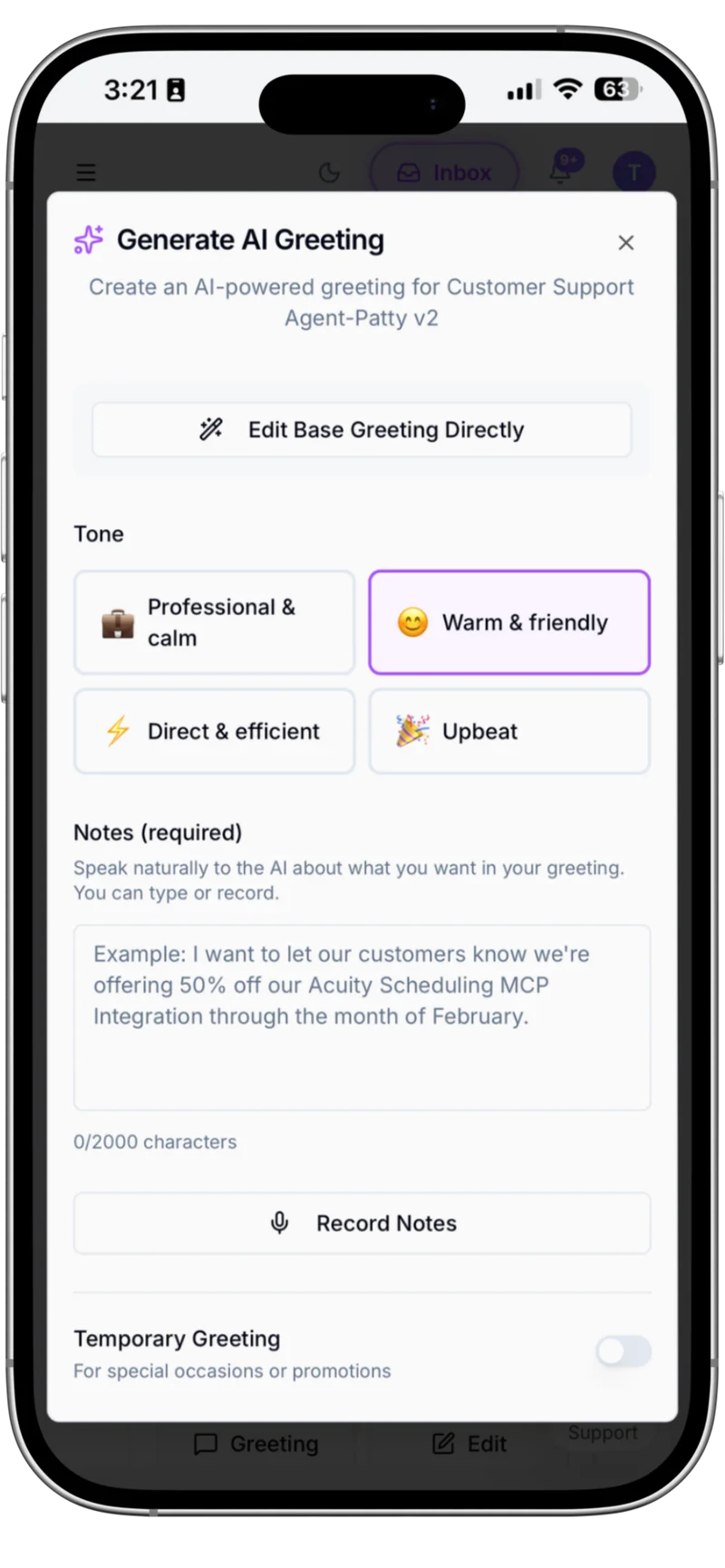
Brand Your AI Receptionist
Customize how Voka AI greets callers and represents your Property Management company. Set your business name, craft your greeting message, define your service offerings, and configure your AI's personality to match your brand—ensuring every caller experiences your company's professionalism from the first hello.
- 2Step 2
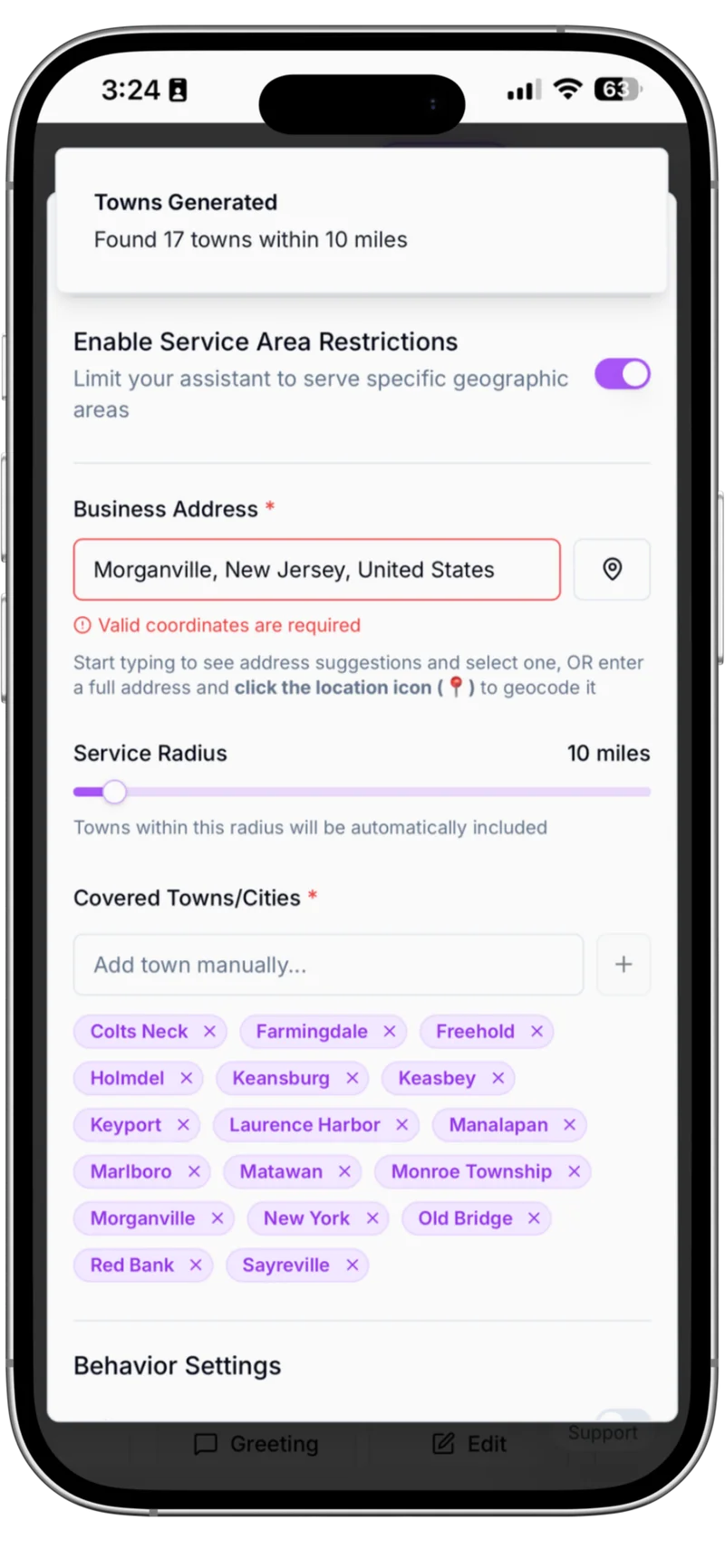
Define Your Service Area
Set your business location and service radius to automatically generate a comprehensive list of towns and cities you serve. Customize your coverage area by adding or removing specific locations, so Voka AI can answer service-area questions from that list.
- 3Step 3
Configure Emergency Protocols
List what counts as an emergency and what should happen next. Define which scenarios trigger immediate warm transfers to your on-call team, and establish after-hours handling—ensuring critical calls reach the right person while routine inquiries are managed appropriately.

- 4Step 4
Monitor Every Call in Your Inbox
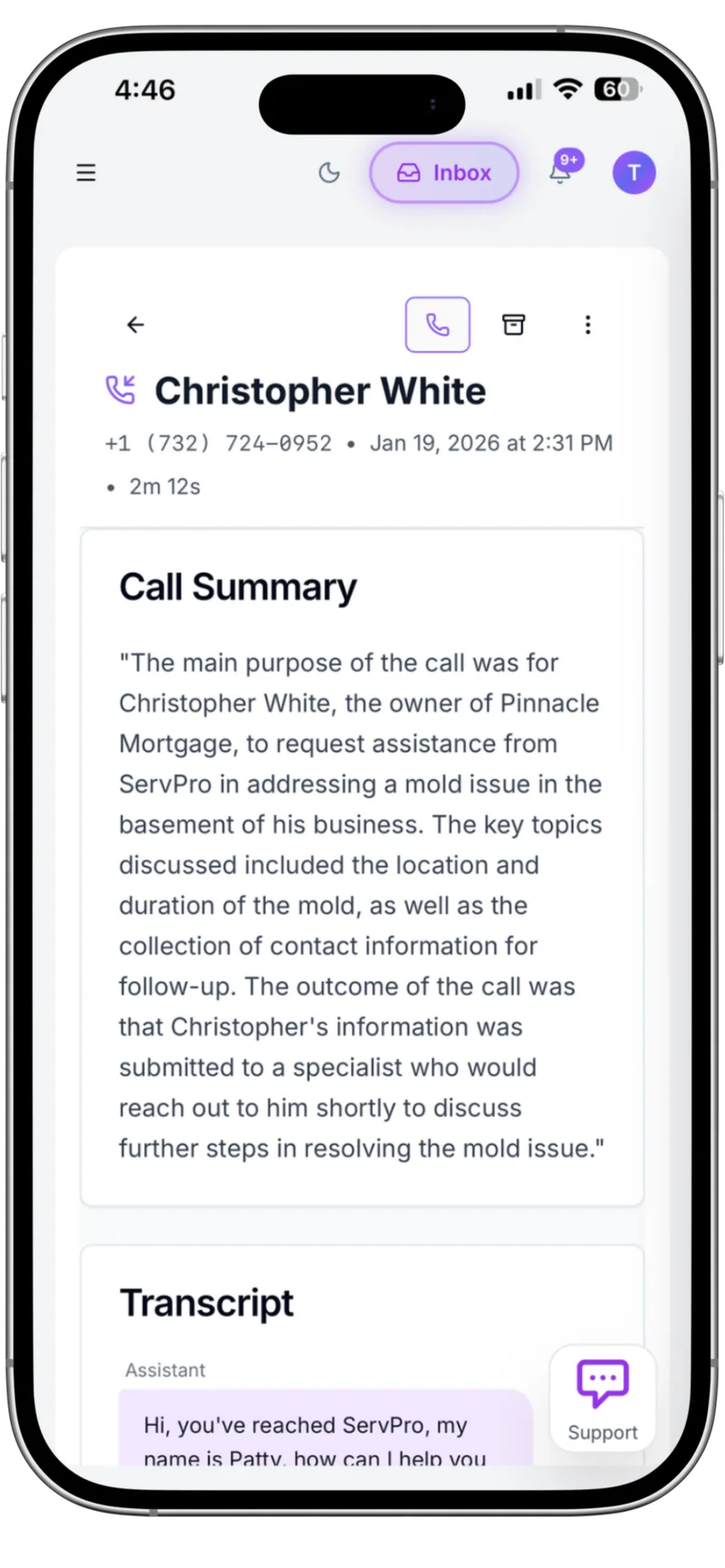
Access all your tenant calls in one organized dashboard. Review call summaries, listen to recordings, read full transcripts, and track which calls were handled by AI versus transferred to your team—giving you complete visibility into your customer communication operations.

- 5Step 5
Get AI-Powered Insights
It asks the qualifying questions you set and puts the answers in the call summary. Every call gets a summary and an outcome tag, and you can add your own insight questions.
Voka AI delivers the professional reception your property management business deserves

- ✓Never miss emergency maintenance calls - 24/7 availability for burst pipes, heating failures, and lockouts
- ✓Answers multiple tenant calls at the same time - No busy signals when several units call about the same issue
- ✓After-hours prospective tenant inquiries - Capture high-quality renters researching properties evenings and weekends
- ✓Warm transfer for emergencies - Critical maintenance issues go to your on-call team with a short briefing; if nobody picks up, Voka logs a callback request and notifies you
Voka AI vs. Traditional Property Management Reception
See how Voka AI outperforms traditional reception solutions for property management businesses.
| Feature | Traditional Service | Voka AI |
|---|---|---|
| 24/7 Availability | Your personal phone rings at all hours, no separation from work | True 24/7/365 coverage, transfers only the emergencies you define, work-life balance restored |
| Predictable Pricing | $500+ monthly for basic service, costs spike during busy periods | Monthly plans with included minutes and a set per-minute rate after that, month-to-month |
| Instant Response | Voicemail while showing properties, missed prospective tenants, delayed emergency response | Answers right away and takes calls about multiple properties at the same time |
| Inquiry Screening | Every caller reaches you directly, no qualification, time wasted on unsuitable prospects | Asks the qualifying questions you set, collects requirements, and puts the answers in the call summary |
| Maintenance Triage | All maintenance requests interrupt you equally, no prioritization, constant disruption | Follows your rules to tell emergencies from routine requests, and transfers only the emergencies you define |
| System Integration | Manual entry into property management software, scattered notes, information silos | Sends maintenance requests to AppFolio, Buildium or Rent Manager through Zapier, Make or n8n workflows you set up |
24/7 Availability
Traditional Service
Your personal phone rings at all hours, no separation from work
Voka AI
True 24/7/365 coverage, transfers only the emergencies you define, work-life balance restored
Predictable Pricing
Traditional Service
$500+ monthly for basic service, costs spike during busy periods
Voka AI
Monthly plans with included minutes and a set per-minute rate after that, month-to-month
Instant Response
Traditional Service
Voicemail while showing properties, missed prospective tenants, delayed emergency response
Voka AI
Answers right away and takes calls about multiple properties at the same time
Inquiry Screening
Traditional Service
Every caller reaches you directly, no qualification, time wasted on unsuitable prospects
Voka AI
Asks the qualifying questions you set, collects requirements, and puts the answers in the call summary
Maintenance Triage
Traditional Service
All maintenance requests interrupt you equally, no prioritization, constant disruption
Voka AI
Follows your rules to tell emergencies from routine requests, and transfers only the emergencies you define
System Integration
Traditional Service
Manual entry into property management software, scattered notes, information silos
Voka AI
Sends maintenance requests to AppFolio, Buildium or Rent Manager through Zapier, Make or n8n workflows you set up
Integrations That Just Work
Voka AI schedules consultations directly into Acuity Scheduling or Google Calendar — and connects to your CRM, spreadsheets, and messaging tools via Zapier, Make, and n8n.
Calendar Sync
Voka writes consultations into Google Calendar so every attorney, advisor, or agent sees the schedule update in real time. Acts as the team-wide view alongside Acuity for the booking record.


Automation Platforms
Hook Voka into your CRM, intake forms, or document workflows. Push every new lead into your sales pipeline, trigger an intake form when a consultation books, log call summaries to a knowledge base — all via Zapier, Make, or self-hosted n8n.


Texts callers booking links, deposit and checkout links, directions, menus and forms, or their appointment details, when they ask.
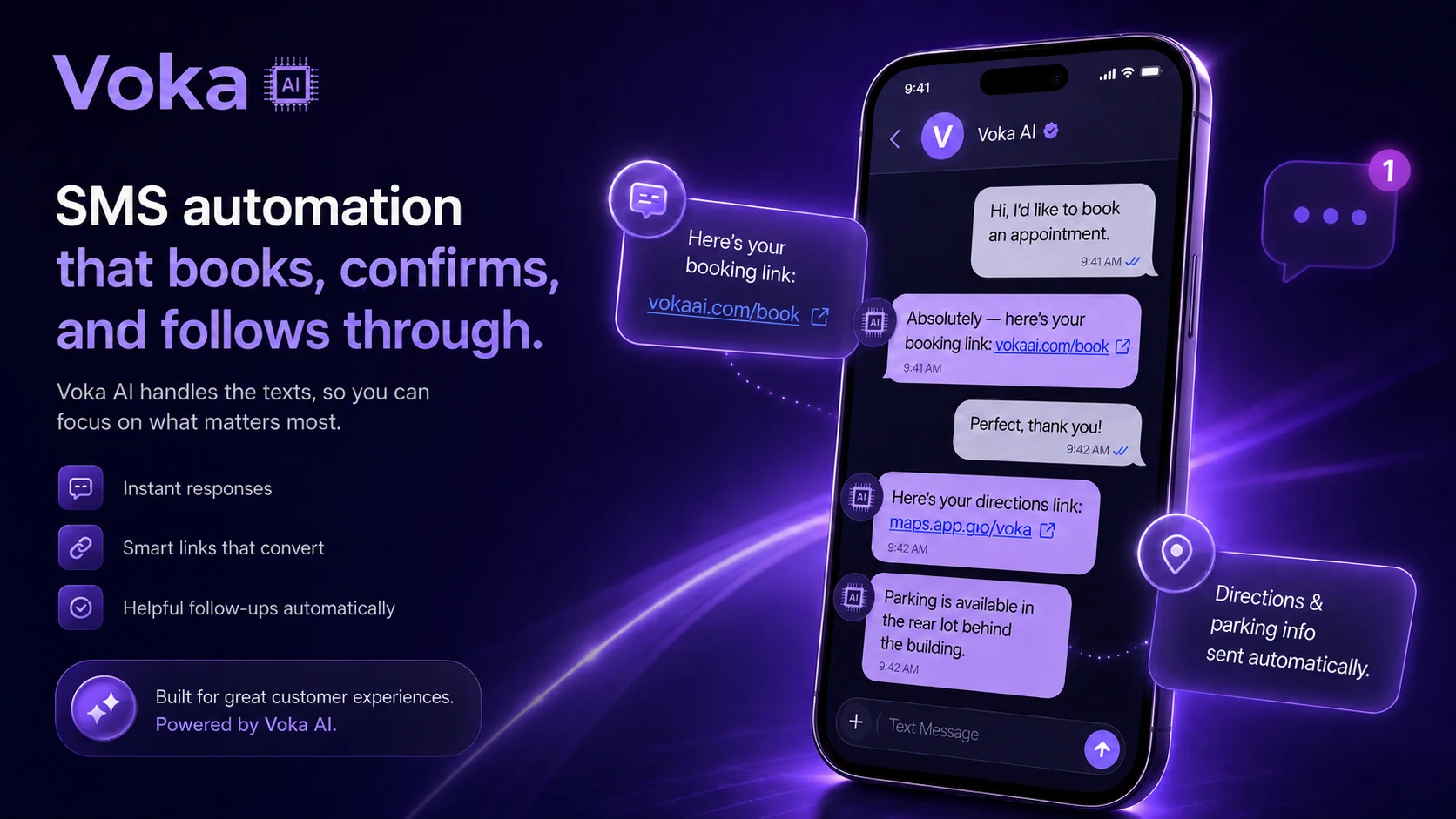
Two simple SMS add-on tiers. Stack with any voice plan.
SMS Starter $14.99/mo — 200 messages, $0.04 overage. SMS Pro $24.99/mo — 500 messages, $0.03 overage. Both tiers: $0 setup fee, dedicated toll-free number included.
Trusted By
Growing Service Businesses Nationwide





Start with the calls you're already missing
You don't hand Voka AI your phones on day one. Most property management businesses start with after-hours only — calls that were going to voicemail anyway — then add overflow during peak hours, and go to full coverage when the booking numbers have earned it. Every phase, those callers reach a receptionist that answers, books, and texts links instead of a beep.
Read the Graduated Rollout playbook →Frequently Asked Questions
Does Voka AI offer implementation support?+
How does Voka AI distinguish between urgent tenant emergencies and routine requests?+
Does Voka AI work during overnight hours and weekends?+
Can Voka AI notify me immediately for tenant emergencies?+
Can I customize what information Voka AI collects from tenants and prospective renters?+
What happens when callers ask questions Voka AI can't answer?+
Can Voka AI provide rental pricing information and schedule property showings?+
Do you provide onboarding assistance?+
How do we integrate Voka AI with our existing phone system?+
Can Voka AI work with my property management software?+
Recommended for Property Management: Value Plan
Most property management businesses pick the Value plan — $149/mo, 600 included minutes at $0.18/min overage. Compare all 5 tiers below.
Comparing options for your property management? See how Voka AI stacks up against the best AI voice receptionists for small businesses — pricing, booking depth, and payment protection, side by side.
“Been testing out Voka AI and honestly the biggest value is not missing calls anymore. The AI receptionist answers immediately, handles appointment scheduling, and gives customers a much better experience than sending them to voicemail. I also like that it integrates with scheduling tools and provides call summaries, which cuts down on a lot of repetitive admin work. The setup was straightforward, and it feels focused on solving real small-business problems rather than just being AI for the sake of AI. Definitely worth looking into if your business depends on inbound calls, bookings, or customer inquiries.”
“FuneralDecisions CRM serves preneed counselors and funeral homes: professionals whose entire practice is built around being present for families in their most vulnerable moments. Adding automated outbound calling to our platform was not something we would do without the right partner. Voka AI is that partner. Their dedicated voice assistant handles appointment confirmations on behalf of our clients with a calm, measured tone that reflects the gravity of this work. The integration with our CRM was seamless, and the same assistant runs reliably across our entire client base. It works exactly as it should.”
“OmniPACS Health Technologies LLC provides cloud-based medical imaging infrastructure to specialty practices nationwide like pain management, orthopedics, OBGYN, and neurology. When a physician or practice administrator has a support issue, it is not a minor inconvenience. Clinical workflows depend on imaging systems functioning correctly. We integrated Voka AI as our Level 1 support layer. The assistant handles inbound support calls, captures the issue, automatically creates a structured ticket in Intercom, and routes it to an available specialist. The results have been concrete for us. Support ticket volume is down significantly and resolution times have dropped by 40%. For a healthcare SaaS vendor, those numbers are not incremental, they are the standard our clients expect us to meet.”
“I am a solo practitioner offering Japanese-inspired head spa treatments: immersive, multi-sensory sessions that require my complete presence and attention from the moment a client walks in. When I'm delivering a 100-minute Herbal Sleep Support ritual or a sound bath treatment, I cannot be stepping out to answer booking calls. Voka AI changed that completely. The assistant books appointments directly through Square while I'm with clients, handling every inquiry professionally and seamlessly. After each booking it sends a deposit link via SMS, which has eliminated no-shows entirely. My revenue is up, my callbacks are gone, and every hour I have is a billable one. It works beautifully!”
“I run a plumbing and heating company and do not have a front office. When a call comes in after hours, it used to either go to voicemail or I was answering it myself at 10pm. Voka AI changed that. Their assistant now handles every after-hours emergency call, captures the caller's information and the nature of the problem, and immediately sends me an email and a text so I can triage without picking up blind. It also books our larger estimate appointments directly into my Google Calendar. I don't lose jobs to voicemail anymore.”
“We build custom cabinetry and millwork for homeowners and contractors. Every job starts with either a house visit to measure and price the project or a showroom appointment to explore options. Both require scheduling, and scheduling calls were pulling my designer and sales person away from the work that actually moves jobs forward. Voka AI handles all of it now. Homeowners calling after hours to request a pricing visit get scheduled on the spot, directly into our Google Calendar. Contractors looking to book a showroom walkthrough get the same seamless experience. The calendar fills itself, and my team stays focused on closing jobs, not coordinating them.”
Simple, Transparent Voice Pricing
Choose from 5 flexible voice plans. All plans include 24/7 call answering with no contracts.
Start free for 14 days or 100 minutes, whichever comes first
No credit card to start — just verify your mobile or a business landline. Forward your business line when you’re ready, and unforward any time. Continuing takes a card.
Start your free trialFlex⭐
- 300 included minutes
- $0.25/min overage
- 2 phone numbers
- 5 AI assistants
All Plans Include
All plans are month-to-month with no long-term contracts. Add premium integrations and additional phone numbers as needed. All plans can purchase additional numbers. Each are sold separately from within your portal.
Voka AI also serves these industries
Ready to never miss another property management call?
Voka answers your calls free for 14 days or 100 minutes, whichever comes first — on a real number, no credit card.