
24/7 Phone Answering & Client Intake
Never Miss a High-Value Client Again - 24/7 AI Answering for Law Firms
When you're in court, meeting with clients, or preparing for trial, potential high-value cases are calling. If they reach voicemail, they're already dialing your competitor. In legal services, the first firm to respond often wins the client.
What Voka AI does for law firm businesses
Voka AI is an AI voice receptionist for law firms that answers every call 24/7, asks your intake questions, and books consultations into Acuity, Google Calendar or Calendly — including the calls that come in while you're in court or with a client. In legal services, the first firm to respond often wins the client.
The Hidden Cost of Missed Calls in Your Law Firm Business
Can't Screen for Case Value or Practice Area Fit
Generic operators can't evaluate whether a personal injury case involves serious damages, if an estate exceeds your minimum threshold, or if the caller needs legal expertise outside your practice areas.
Lose High-Value Clients to Faster-Responding Competitors
When potential clients need legal representation, they expect immediate attention. If they reach voicemail or wait on hold, they'll call the next attorney who can schedule a consultation on the spot.
Miss Urgent After-Hours Client Matters
Existing clients calling about arrests, emergency protective orders, or time-sensitive filings can't reach you. By morning, they've already retained different counsel or missed critical deadlines.
Why Professional Law Firm Businesses Can't Afford to Operate Without 24/7 AI Answering
Remarkably Natural Legal Conversations
Our AI communicates like an experienced legal intake coordinator, understanding questions such as "What are your fees for a divorce?" or "Can you help with a workers' comp case?" and responding with both accuracy and professional discretion.
Warm Transfers for Urgent Matters
For the situations you list as urgent - an arrest, a protective order, a time-sensitive filing, an existing client in crisis - Voka AI warm-transfers the caller to your on-call attorney with a short briefing. If nobody picks up, it logs a callback request and notifies you by email (or text with SMS).
Comprehensive Consultation Preparation
Configure exactly what case information Voka AI collects: incident details, parties involved, damages or injuries, statute of limitations concerns, prior legal representation - whatever your attorneys need to conduct effective consultations.
A Record of Every Intake Call
Every consultation request is recorded, transcribed and summarised in your dashboard, so you can see who called, what they wanted and exactly what they were told — rather than relying on an operator's note. Configure what the assistant will and will not discuss so substantive questions reach a person.
What Makes Voka AI Your Law Firm Business's Competitive Edge
Runs Your Intake Questions
Whether it's personal injury, family law, estate planning, or criminal defense, Voka AI asks the intake questions you set and puts the answers in the call summary, so you can check each inquiry against your practice areas and criteria.
Schedules Consultations on the Call
Voka AI checks attorney availability in Acuity, Google Calendar or Calendly and books consultation appointments in real-time, reading the details back before the caller hangs up - converting prospects into scheduled consultations immediately.
Keeps Substantive Questions for a Person
Set what it will and won't discuss, so substantive questions go to a person. Voka AI takes contact details and matter type, and every call has a recording, transcript and summary in your dashboard.
Routes Inquiries by Practice Area
Set transfer rules by case type, legal issue, and attorney expertise. Personal injury calls route to PI attorneys, family law matters to family practitioners, ensuring each consultation is scheduled with the right attorney.
Getting Started in 5 Simple Steps
- 1Step 1
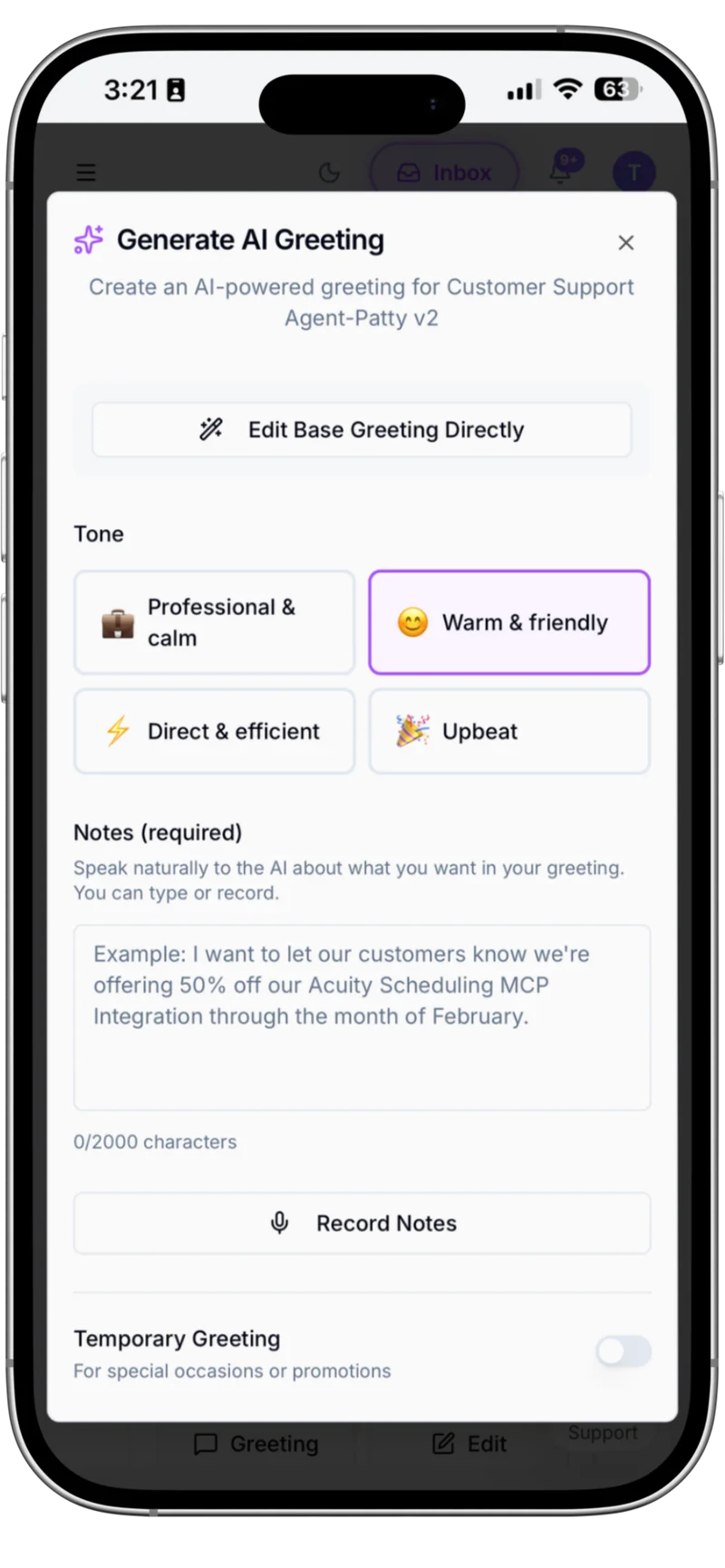
Brand Your AI Legal Intake Assistant
Customize how Voka AI represents your law firm. Set your firm name, craft your professional greeting, define your practice areas and fee structures, configure your AI's tone to match your firm's brand - ensuring every caller experiences the sophisticated, confidential service that reflects your legal expertise.
- 2Step 2
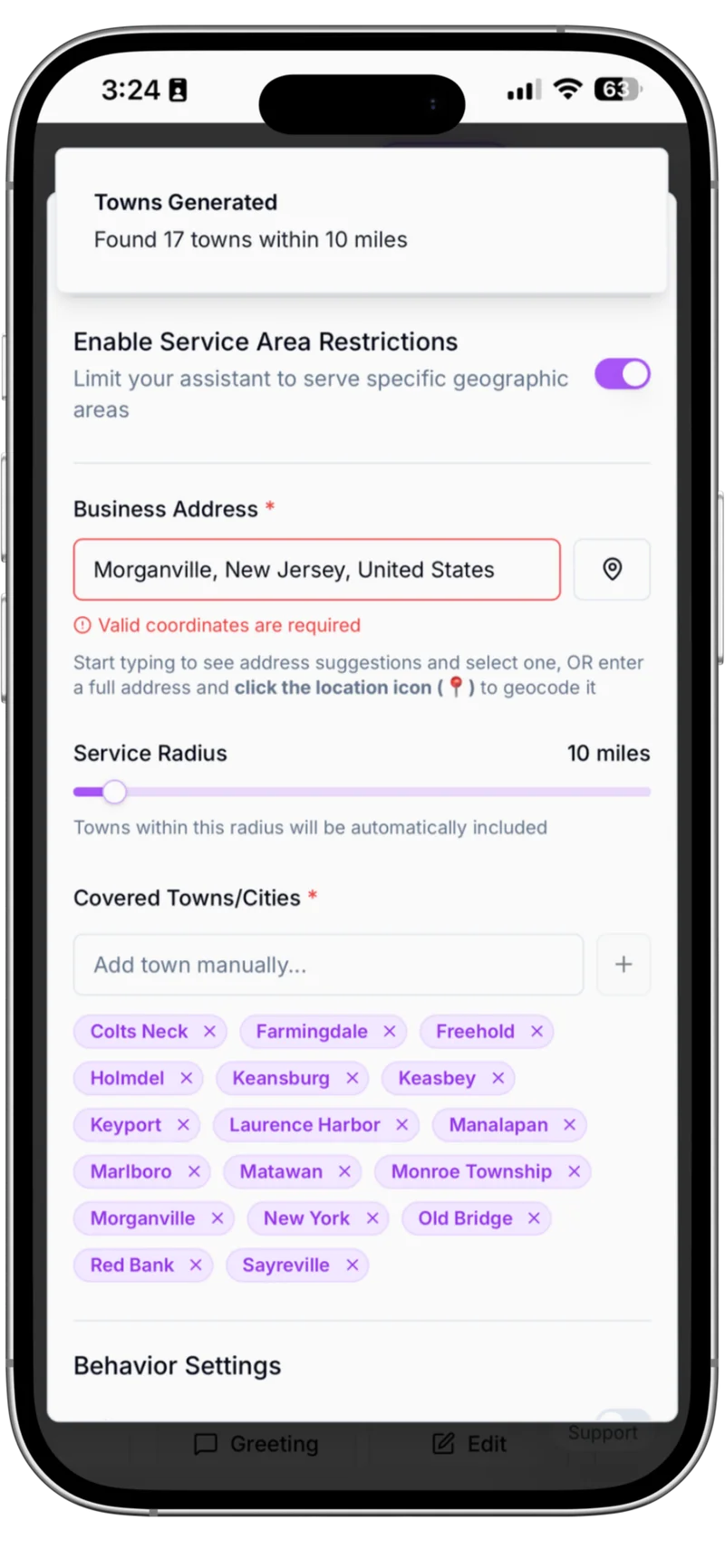
Configure Practice Areas & Client Qualification
Define your practice areas and client qualification criteria. Set the screening questions it asks about case type, case value and location, and how it handles matters outside your practice areas - so qualified prospects are booked and the rest are referred politely.
- 3Step 3
Configure Urgent Matter Protocols
Set up your emergency response system for urgent legal matters. Define which scenarios trigger a warm transfer to your on-call attorney (arrests, protective orders, time-sensitive filings), configure backup numbers, and set after-hours handling - ensuring critical matters reach the right attorney.

- 4Step 4
Monitor Every Consultation Request
Access all consultation requests in one dashboard. Review intake summaries, listen to recorded calls, read full transcripts, track scheduled consultations, and monitor which inquiries were qualified versus referred - giving you complete visibility into your firm's client acquisition.

- 5Step 5
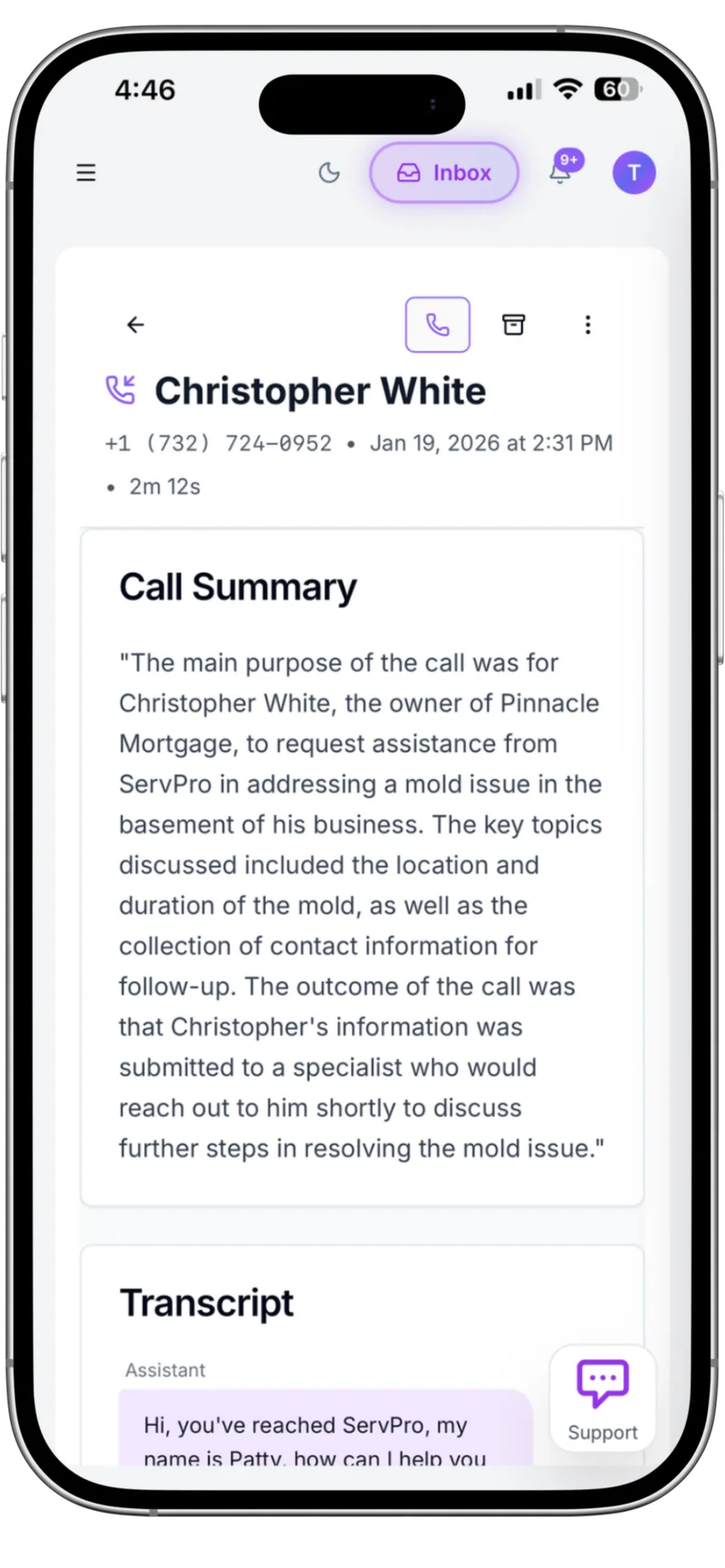
Get AI-Powered Legal Intake Insights
It asks the qualifying questions you set and puts the answers in the call summary. Every call gets a summary and an outcome tag, and you can add your own insight questions.
Experience the Voka AI Advantage
Hear how Voka AI handles a real law firm call — capturing intent, booking the appointment, and confirming details with the caller.

Law Firm call sample
Sample consultation call recording
Voka AI delivers the professional reception your law firm business deserves
- ✓Never miss high-value consultation requests - 24/7 availability for urgent legal matters
- ✓Client screening - asks the qualifying questions you set (practice area, case details) and puts the answers in the call summary
- ✓Instant consultation booking - Schedule appointments in real-time while collecting detailed case information
- ✓A record of every call — recording, transcript and summary — so you can see exactly what a caller was told
Voka AI vs. Traditional Law Firm Reception
See how Voka AI outperforms traditional reception solutions for law firm businesses.
| Feature | Traditional Service | Voka AI |
|---|---|---|
| 24/7 Availability | High fees, weekend surcharges, limited simultaneous capacity | True 24/7/365 coverage included, answers multiple calls at the same time, monthly plans with included minutes |
| Legal Intake Expertise | Generic operators can't qualify cases or evaluate practice area fit, must take basic messages only | Asks the intake and qualifying questions you set, screens by practice area, and puts the answers in the call summary |
| Consultation Scheduling | Takes messages for callback, can't access calendars, prospects wait hours or days for scheduling | Books consultations on the call into Acuity, Google Calendar or Calendly, and collects intake answers right on the call |
| Client Confidentiality | Calls rotate through multiple operators, each handling matters differently, with no record of what was said | One assistant handling every call the same way, with a transcript and summary of each so you can see exactly what a caller was told |
| Case Details Collection | Basic contact information only, can't conduct detailed intake, attorneys lack case context before consultations | Collects comprehensive case details, incident dates, parties involved, damages, prior representation, full intake |
| Practice Management Integration | Manual data entry required, information gets lost, no system integration, double work for staff | Books into Google Calendar or Calendly, and sends intake details to your practice management software through Zapier, Make or n8n workflows you set up |
24/7 Availability
Traditional Service
High fees, weekend surcharges, limited simultaneous capacity
Voka AI
True 24/7/365 coverage included, answers multiple calls at the same time, monthly plans with included minutes
Legal Intake Expertise
Traditional Service
Generic operators can't qualify cases or evaluate practice area fit, must take basic messages only
Voka AI
Asks the intake and qualifying questions you set, screens by practice area, and puts the answers in the call summary
Consultation Scheduling
Traditional Service
Takes messages for callback, can't access calendars, prospects wait hours or days for scheduling
Voka AI
Books consultations on the call into Acuity, Google Calendar or Calendly, and collects intake answers right on the call
Client Confidentiality
Traditional Service
Calls rotate through multiple operators, each handling matters differently, with no record of what was said
Voka AI
One assistant handling every call the same way, with a transcript and summary of each so you can see exactly what a caller was told
Case Details Collection
Traditional Service
Basic contact information only, can't conduct detailed intake, attorneys lack case context before consultations
Voka AI
Collects comprehensive case details, incident dates, parties involved, damages, prior representation, full intake
Practice Management Integration
Traditional Service
Manual data entry required, information gets lost, no system integration, double work for staff
Voka AI
Books into Google Calendar or Calendly, and sends intake details to your practice management software through Zapier, Make or n8n workflows you set up
Integrations That Just Work
Voka AI schedules consultations directly into Acuity Scheduling or Google Calendar — and connects to your CRM, spreadsheets, and messaging tools via Zapier, Make, and n8n.
Booking Platforms
Voka books consultations and discovery calls directly into Acuity Scheduling. The AI collects the intake fields Acuity marks required — and will not complete the booking until they are answered — and checks real availability across multiple advisors or attorneys.

Calendar Sync
Voka writes consultations into Google Calendar so every attorney, advisor, or agent sees the schedule update in real time. Acts as the team-wide view alongside Acuity for the booking record.

Automation Platforms
Hook Voka into your CRM, intake forms, or document workflows. Push every new lead into your sales pipeline, trigger an intake form when a consultation books, log call summaries to a knowledge base — all via Zapier, Make, or self-hosted n8n.


Texts callers booking links, deposit and checkout links, directions, menus and forms, or their appointment details, when they ask.
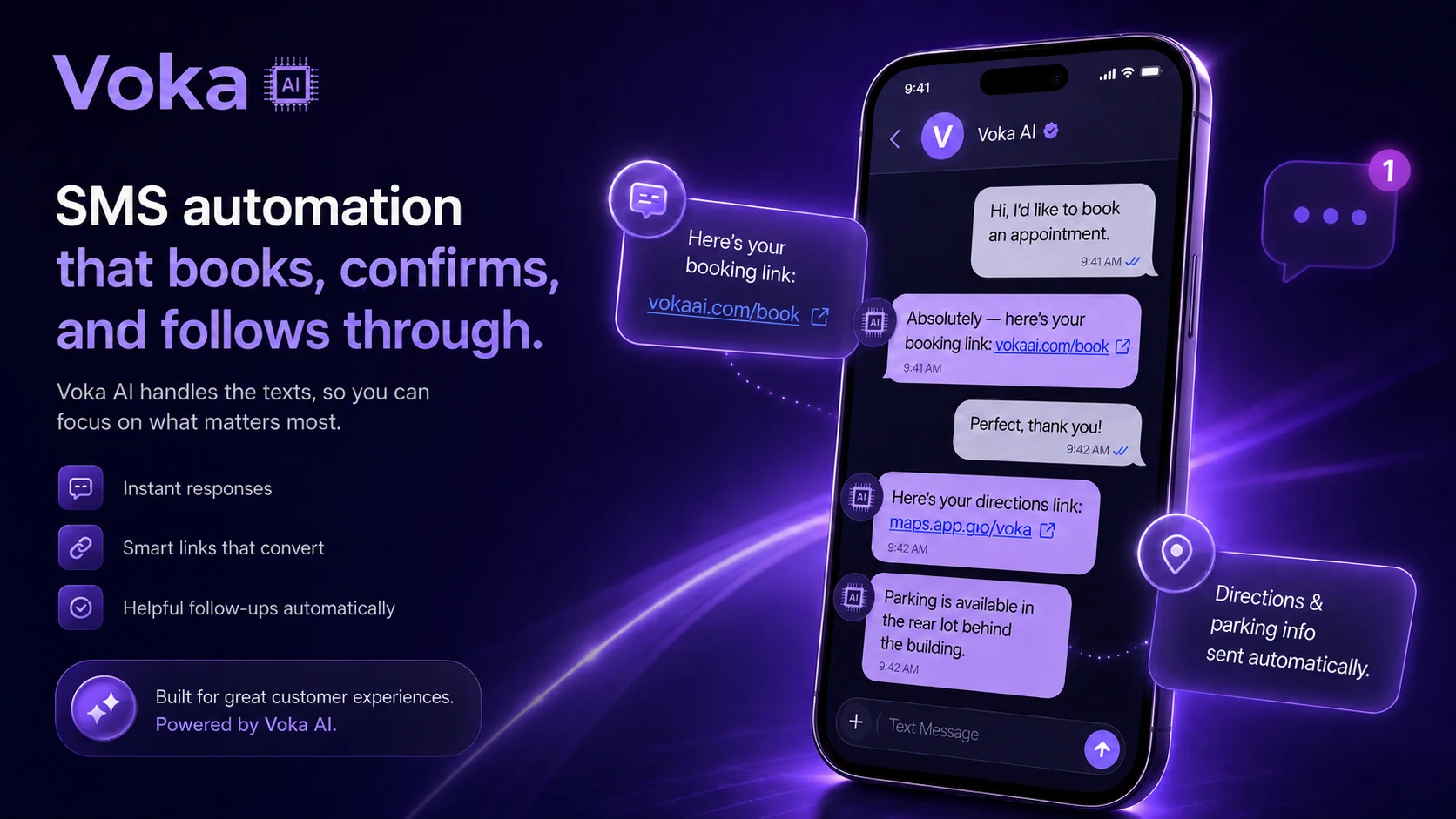
Two simple SMS add-on tiers. Stack with any voice plan.
SMS Starter $14.99/mo — 200 messages, $0.04 overage. SMS Pro $24.99/mo — 500 messages, $0.03 overage. Both tiers: $0 setup fee, dedicated toll-free number included.
Trusted By
Growing Service Businesses Nationwide





Start with the calls you're already missing
You don't hand Voka AI your phones on day one. Most law firm businesses start with after-hours only — calls that were going to voicemail anyway — then add overflow during peak hours, and go to full coverage when the booking numbers have earned it. Every phase, those callers reach a receptionist that answers, books, and texts links instead of a beep.
Read the Graduated Rollout playbook →Frequently Asked Questions
How does Voka AI maintain client confidentiality?+
Can Voka AI screen for conflicts of interest?+
Does Voka AI handle urgent after-hours client matters?+
Can Voka AI qualify potential clients by practice area?+
How does Voka AI handle consultation scheduling?+
Can Voka AI provide fee information to callers?+
Does Voka AI integrate with legal practice management software?+
How does Voka AI distinguish high-value cases from low-priority inquiries?+
Can Voka AI collect detailed case information before consultations?+
What happens if Voka AI encounters a complex legal question?+
Recommended for Law Firm: Value Plan
Most law firm businesses pick the Value plan — $149/mo, 600 included minutes at $0.18/min overage. Compare all 5 tiers below.
Comparing options for your law firm? See how Voka AI stacks up against the best AI voice receptionists for small businesses — pricing, booking depth, and payment protection, side by side.
“Been testing out Voka AI and honestly the biggest value is not missing calls anymore. The AI receptionist answers immediately, handles appointment scheduling, and gives customers a much better experience than sending them to voicemail. I also like that it integrates with scheduling tools and provides call summaries, which cuts down on a lot of repetitive admin work. The setup was straightforward, and it feels focused on solving real small-business problems rather than just being AI for the sake of AI. Definitely worth looking into if your business depends on inbound calls, bookings, or customer inquiries.”
“FuneralDecisions CRM serves preneed counselors and funeral homes: professionals whose entire practice is built around being present for families in their most vulnerable moments. Adding automated outbound calling to our platform was not something we would do without the right partner. Voka AI is that partner. Their dedicated voice assistant handles appointment confirmations on behalf of our clients with a calm, measured tone that reflects the gravity of this work. The integration with our CRM was seamless, and the same assistant runs reliably across our entire client base. It works exactly as it should.”
“OmniPACS Health Technologies LLC provides cloud-based medical imaging infrastructure to specialty practices nationwide like pain management, orthopedics, OBGYN, and neurology. When a physician or practice administrator has a support issue, it is not a minor inconvenience. Clinical workflows depend on imaging systems functioning correctly. We integrated Voka AI as our Level 1 support layer. The assistant handles inbound support calls, captures the issue, automatically creates a structured ticket in Intercom, and routes it to an available specialist. The results have been concrete for us. Support ticket volume is down significantly and resolution times have dropped by 40%. For a healthcare SaaS vendor, those numbers are not incremental, they are the standard our clients expect us to meet.”
“I am a solo practitioner offering Japanese-inspired head spa treatments: immersive, multi-sensory sessions that require my complete presence and attention from the moment a client walks in. When I'm delivering a 100-minute Herbal Sleep Support ritual or a sound bath treatment, I cannot be stepping out to answer booking calls. Voka AI changed that completely. The assistant books appointments directly through Square while I'm with clients, handling every inquiry professionally and seamlessly. After each booking it sends a deposit link via SMS, which has eliminated no-shows entirely. My revenue is up, my callbacks are gone, and every hour I have is a billable one. It works beautifully!”
“I run a plumbing and heating company and do not have a front office. When a call comes in after hours, it used to either go to voicemail or I was answering it myself at 10pm. Voka AI changed that. Their assistant now handles every after-hours emergency call, captures the caller's information and the nature of the problem, and immediately sends me an email and a text so I can triage without picking up blind. It also books our larger estimate appointments directly into my Google Calendar. I don't lose jobs to voicemail anymore.”
“We build custom cabinetry and millwork for homeowners and contractors. Every job starts with either a house visit to measure and price the project or a showroom appointment to explore options. Both require scheduling, and scheduling calls were pulling my designer and sales person away from the work that actually moves jobs forward. Voka AI handles all of it now. Homeowners calling after hours to request a pricing visit get scheduled on the spot, directly into our Google Calendar. Contractors looking to book a showroom walkthrough get the same seamless experience. The calendar fills itself, and my team stays focused on closing jobs, not coordinating them.”
Simple, Transparent Voice Pricing
Choose from 5 flexible voice plans. All plans include 24/7 call answering with no contracts.
Start free for 14 days or 100 minutes, whichever comes first
No credit card to start — just verify your mobile or a business landline. Forward your business line when you’re ready, and unforward any time. Continuing takes a card.
Start your free trialFlex⭐
- 300 included minutes
- $0.25/min overage
- 2 phone numbers
- 5 AI assistants
All Plans Include
All plans are month-to-month with no long-term contracts. Add premium integrations and additional phone numbers as needed. All plans can purchase additional numbers. Each are sold separately from within your portal.
Voka AI also serves these industries
Ready to never miss another law firm call?
Voka answers your calls free for 14 days or 100 minutes, whichever comes first — on a real number, no credit card.